Samantha: A Script Font Worth Understanding Before You Use It
If you have spent any time browsing script fonts, you have likely come across Samantha. It appears in design portfolios, wedding invitations, branding mockups, and social media graphics. At first glance, it looks like many other elegant cursive fonts. But Samantha is not just another script. It is a font built with unusual care, and treating it like an ordinary download can lead to results that fall short of what the font can actually deliver.
This article walks through what Samantha really is, where people commonly go wrong with it, and how to get the most out of its design. Whether you are a seasoned designer or someone picking a font for a personal project, understanding these details will save you time, frustration, and money.
What Samantha Actually Is
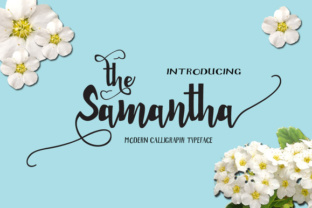
Samantha is a script font created from hand-drawn letters. The designer drew each character by hand, then scanned every single letter individually, digitized it, and refined it until the curves and connections worked flawlessly. The result is a font with over 430 unique glyphs, which is far more than what most script fonts offer. Each letter was engineered to blend into the next, creating a flow that mimics natural handwriting without the usual mechanical feel of typed scripts.
The font sits somewhere between cursive and calligraphy. It has the fluidity of a pen moving across paper, but with the consistency and precision of a digital typeface. The swashes embedded in Samantha allow for endless variations in how words and letters connect, making every composition slightly different depending on how you apply the font's OpenType features.
This complexity is exactly where people start making mistakes. The features that make Samantha powerful are also the features that cause problems when ignored or misunderstood.
Mistake Number One: Treating Samantha Like a Basic Script Font
The most common error is assuming Samantha works the same way as any other script font you install and type with. Many people download Samantha, type a word, and wonder why the letters do not connect smoothly or why certain combinations look awkward. They assume the font is poorly made or that something went wrong during installation.
The reality is that Samantha relies heavily on OpenType features to deliver its full potential. Without enabling contextual alternates, stylistic sets, and discretionary ligatures, you are only seeing a fraction of what the font offers. The basic character set is functional, but the magic happens when the software you are using recognizes and applies these features automatically.
How to avoid this: Before you use Samantha in any project, check whether your design software supports OpenType features. Adobe Illustrator, InDesign, Photoshop, Affinity Designer, and even recent versions of Microsoft Word and Apple Pages can handle these features. Learn where the OpenType panel or menu is located in your software. Enable contextual alternates and discretionary ligatures by default when working with Samantha. If you are coding a website, make sure your CSS includes font-feature-settings and font-variant-ligatures declarations so the browser renders the font correctly.
Mistake Number Two: Ignoring the Swashes Entirely
Samantha contains a large number of swashes, which are the decorative flourishes attached to certain letters. Some of these swashes are subtle, while others are dramatic. Many users either never discover these swashes or apply them indiscriminately, resulting in text that looks overly ornate or hard to read.
For example, using a heavy swash on every capital letter in a word can make the word illegible, especially at small sizes. Conversely, never using any swashes can make Samantha look plain and indistinguishable from other script fonts. The swashes are what give Samantha its personality, but they need to be used with intention.
How to avoid this: Experiment with stylistic sets. Most OpenType fonts with swashes organize them into stylistic sets that you can toggle on and off. Start by applying swashes only to the first letter of a word or to letters that naturally benefit from flourish, like h, k, l, or capital letters. Test your text at the size it will actually be viewed. A swash that looks elegant on a poster might look messy on a business card. Think of swashes like seasoning: a little adds flavor, too much ruins the dish.
Mistake Number Three: Forgetting about Language Support
Samantha supports a wide range of Western languages based on the Latin alphabet, including accented characters and diacritical marks. However, not every script font handles these characters with the same care. Some users assume that because Samantha looks good in English, it will automatically look just as good in French, German, Spanish, or Polish.
In many script fonts, accented letters are afterthoughts, added quickly to fill a character set. In Samantha, the accented glyphs were crafted with the same hand-drawn care as the base letters. Still, you need to verify that the specific characters you need exist in the font and that they connect properly with surrounding letters. A missing or poorly designed accented character can break the flow of an entire word.
How to avoid this: Before you commit to using Samantha for a multilingual project, open the font's glyph panel and scroll through the accented characters. Test real words in the languages you need. If you are working with a language that uses diacritics above or below letters, check whether the accents collide with swashes from adjacent characters. In some cases, you may need to use a simpler stylistic set or manually adjust spacing to avoid visual overlap.
Mistake Number Four: Downloading from Unreliable Sources
Samantha is a premium font, and like many popular typefaces, it is widely pirated. A quick search yields dozens of download links offering Samantha for free. Some of these copies are incomplete, missing the OpenType features, swashes, or language support that make the font valuable. Others are corrupted, renamed, or bundled with malware.
Using a pirated or improperly extracted copy of Samantha guarantees that you will miss out on the very features that justify its cost. You will likely end up with a stripped-down version that looks generic and behaves like any basic script font. Worse, you may introduce legal or security risks into your workflow.
How to avoid this: Purchase Samantha from a reputable foundry or authorized distributor. Check that your purchase includes the full OpenType feature set and all 430-plus glyphs. If you are unsure, contact the seller before buying. A legitimate license also gives you access to updates and support, which matters if you encounter rendering issues in new software versions. If budget is a concern, consider that a properly licensed font is an investment in your work's quality and professionalism. There is no shortcut that delivers the same result.
Mistake Number Five: Using Samantha in the Wrong Context
Samantha is beautiful, but it is not the right font for every situation. Some users fall in love with the look and try to use it for body text, long paragraphs, or small sizes where script fonts struggle. Script fonts, including Samantha, are designed primarily for display purposes: headlines, titles, short quotes, names, invitations, and branding elements where the decorative quality can shine.
When Samantha is used for long passages at small sizes, readability drops. The swashes become visual noise. The connecting strokes make letters harder to distinguish. Readers have to work harder to parse each word, which undermines the message you are trying to communicate.
How to avoid this: Reserve Samantha for short, impactful text. Use it for a hero headline, a logo, an invitation header, or a pull quote. Pair it with a clean, simple sans-serif or serif font for body copy. This contrast allows Samantha to stand out without overwhelming the reader. Test your design at the actual size it will be viewed. If you have to squint to read a word, the font is too small or the context is wrong.
Mistake Number Six: Not Testing Letter Combinations
Because Samantha was hand-drawn and digitized letter by letter, most combinations flow well automatically. But no font is perfect for every possible letter pairing. Certain combinations, especially those involving swashes, complex ligatures, or unusual character shapes, can create unexpected spacing or visual collisions.
For example, a swash on a capital F might extend too far into the space of the next letter. A discretionary ligature might combine two letters in a way that looks great in a sample but reads awkwardly in your specific word. These issues are not defects. They are inherent to a font with as much detail as Samantha, and they require you to check your work.
How to avoid this: After you set your text, zoom in and manually inspect every letter combination. Look for overlapping strokes, awkward gaps, or swashes that distract rather than enhance. Most design software allows you to adjust kerning manually for specific pairs. You can also experiment with different stylistic sets or disable certain ligatures to find the best version of a given word. This step takes time, but it is what separates a competent design from a polished one.
What to Check Before You Buy or Use Samantha
Before you make a final decision, run through this checklist to ensure Samantha is the right fit for your project and that you will be able to use it effectively.
- Software compatibility: Does your design tool support OpenType features? If you are working in a basic text editor or an older version of software, you may not be able to access the swashes, ligatures, and stylistic alternates that define Samantha.
- Glyph coverage: Does Samantha include all the characters you need? Check for accented letters, punctuation, and any special symbols your project requires. Open the glyph panel and confirm before you start designing.
- License terms: Can you use Samantha for your specific purpose? Some licenses restrict commercial use, web embedding, or app integration. Read the license carefully or contact the foundry.
- Fallback plan: What happens if Samantha does not load for a viewer? If you are using it on a website, specify a fallback script font that maintains a similar feel. If you are delivering print files, outline the text or embed the font to avoid substitution.
- Test drive: Many foundries offer trial versions or allow you to test the font with your own words. Use this option before buying. Type your actual content, enable the OpenType features, and see how it looks in context.
Final Thoughts on Working with Samantha
Samantha is a script font that rewards attention and care. The designer put significant effort into drawing, scanning, and refining each letter, and that effort is visible when the font is used properly. People who skip the setup, ignore the features, or rely on pirated copies end up with results that look ordinary and forgettable. People who take the time to understand Samantha's capabilities end up with designs that feel custom, handcrafted, and intentional.
If you are considering using Samantha for a project, the best thing you can do is treat it seriously. Learn your software's OpenType controls. Test every letter combination. Use swashes deliberately. Buy from a legitimate source. These steps do not take long, and they make the difference between a font that looks good and a font that looks like it was made for your specific message.
Script fonts are easy to choose impulsively because they all look similar in previews. But Samantha has depth that most do not. Give it the respect it was designed with, and your work will reflect that care.