Phuture Phlames: A Practical Guide to Jeff Bensch's Iconic Display Font
Typography choices shape how an audience perceives a message before they read a single word. Among the many display faces available, Phuture Phlames stands apart. Designed by Jeff Bensch, this font commands attention with its distorted, flame-like letterforms and unapologetically retro-futuristic character. It is not a workhorse text face. It is a deliberate, high-impact tool for projects where personality and visual attitude matter more than readability at small sizes.
Understanding what Phuture Phlames is, where it fits in a design or content workflow, and how to integrate it effectively can save hours of experimentation. This article covers the practical side of working with the font: when to use it, how to prepare for it, and how it interacts with other tools, assets, and decisions in a real project.
What Phuture Phlames Is and Where It Belongs
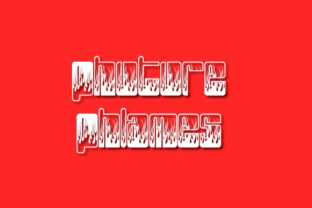
Phuture Phlames is a display typeface that pushes letterforms into exaggerated, almost organic shapes. The characters appear melted, stretched, or warped, as if caught in a heat haze. Jeff Bensch created the design during a period when experimental typography was gaining traction in underground music scenes, zine culture, and early digital design. The font carries a strong association with 1990s rave posters, sci-fi B-movie aesthetics, and psychedelic visual styles.
This is not a font for body text. It works best at larger sizes where the distorted details remain legible and impactful. Common applications include posters, album covers, event flyers, merchandise graphics, video titles, social media visuals, and branding for businesses that want a raw, unconventional edge. It also appears in experimental web headers, game UI mockups, and personal art projects.
In a broader process, Phuture Phlames occupies the attention-grabbing layer. It is the element that makes someone stop scrolling, pause at a poster, or notice a product label. Once interest is captured, supporting fonts and visuals carry the detailed message.
How Phuture Phlames Fits Into a Workflow
Every project follows some kind of process, whether structured or loose. Phuture Phlames can enter that process at different points, depending on your role and goals.
Before a Project: Setting the Visual Direction
If you are in the planning or concept phase, testing Phuture Phlames early can define the tone before you invest time in layouts. Open a design tool, type a working title or a single strong word, and scale it up. Does the visual energy match what you are trying to communicate? If the project calls for nostalgia, rebellion, or a DIY feel, the font can anchor your mood board.
During this stage, gather reference images that share the font's aesthetic: neon lighting, grainy textures, distorted photography, and high-contrast color palettes. These references will inform the rest of your asset decisions, from photography to illustration style.
During a Project: Placement and Hierarchy
Once you move into execution, Phuture Phlames should be reserved for the highest-priority text elements. Headlines, event names, product lines, and key phrases benefit most from its personality. Pair it with clean, neutral fonts for supporting information. A sans-serif like Helvetica, Inter, or even a simple monospace creates contrast that helps the display text stand out without competing.
Consider color and background. Because the letterforms are already busy, a solid or subtly textured background works better than a photograph with complex details. Dark backgrounds with bright, saturated text colors amplify the futuristic feel. Neon pinks, electric blues, and acid greens are natural partners.
After a Project: Review and Reuse
After a project wraps, review how the font performed in context. Did it hold up at the sizes used? Did the distorted shapes cause legibility issues for certain words? Make notes for future use. Phuture Phlames is not a font you use in every project, but when it fits, it adds a distinct voice that audiences recognize.
For long-term use, organize the font file in your asset library with clear metadata. Tag it with descriptors like "display," "experimental," "psychedelic," "retro-futuristic," and "high-impact." This makes retrieval fast when a new brief calls for that specific energy.
Practical Implementation Tips
Working with a highly stylized display font requires attention to detail. Here are considerations that affect usability, consistency, and final quality.
Preparation and Compatibility
Phuture Phlames is available in common font formats including OTF and TTF. It installs as a standard desktop font and works across major operating systems and design software such as Adobe Creative Cloud, Affinity Suite, Figma, Sketch, and even web-based design tools. Before starting, confirm that the font license covers your intended use. Some foundries restrict commercial use or limit the number of users. If you are working with a team, make sure everyone has access to the same version to avoid substitution issues.
If you plan to use the font on the web, consider converting it to WOFF or WOFF2 formats. Test rendering across browsers because highly distorted letterforms can behave unpredictably, especially in older rendering engines. Set appropriate fallback fonts in your CSS so that if the font fails to load, the page still maintains a reasonable visual hierarchy.
Usability and Readability
Because Phuture Phlames prioritizes shape over clarity, readability drops sharply below 24 points. For print, use it at 36 points or larger. For digital screens, test at various sizes and distances. If a word contains similar-looking characters, check whether the distortion makes them too ambiguous. Users should not have to guess a letter.
Avoid setting long phrases in this font. Two to five words is a safe range. If you need a longer headline, break it into lines or use the font only for the key word and set the rest in a simpler face.
Organization and Efficiency
In a shared workflow, keep font files in a centralized asset library. If you use cloud-based design tools, upload the font to the team library so everyone accesses the same file. Name the font clearly, including the designer's name if the team manages many display faces. Consistent naming prevents confusion when someone searches for "Jeff Bensch font" or "flame display."
Create a project template that includes your standard pairing fonts and a few pre-sized text layers using Phuture Phlames. This reduces setup time when starting new work in the same visual direction.
Quality Control and Consistency
Preview the font at the exact output size before finalizing. What looks dramatic on screen at 72 points may lose definition when printed at 48 points on uncoated paper. Print a test sample if possible. Adjust tracking and kerning manually if the default spacing creates awkward gaps. Display fonts often require tighter or looser spacing than body text faces.
If the project includes multiple people approving the design, present early comps with the font applied. Stakeholders sometimes react negatively to unconventional typefaces if they see them for the first time in a final draft. Early exposure builds confidence and avoids last-minute changes.
How Phuture Phlames Interacts with Other Tools and Assets
No font works in isolation. Phuture Phlames interacts with everything around it, and understanding those interactions improves your results.
With Other Fonts
The stylized nature of Phuture Phlames demands a neutral counterpart. Sans-serif fonts with even stroke widths and moderate proportions create the necessary contrast. Avoid pairing it with other decorative or script fonts, as the result becomes chaotic. Stick to one display face and one or two supporting faces at most.
With Images and Graphics
Photography with high contrast, strong backlighting, or neon elements aligns well with the font's personality. Grainy textures, halftone patterns, and glitch effects also complement the look. If the imagery is subtle or minimalist, the font can serve as the primary visual focal point. In either case, leave enough negative space around the text so the distorted letterforms are not crowded.
With Color
Phuture Phlames delivers best against flat color fields or simple gradients. Neon and fluorescent colors are natural choices, but dark monochromatic backgrounds with a single bright accent also work. Avoid low-contrast combinations like light gray on white, which bury the details.
With Platforms and Media
On social media, use the font for static graphics, animated text overlays, or short video titles. On merchandise, test the font at the actual print size and consider how the distortion interacts with fabric textures or curved surfaces. For event posters, the font can carry the primary announcement while a secondary font handles dates, locations, and fine print.
For a Graphic Designer
When a client requests a poster for a retro-themed music event, start the mood board with Phuture Phlames as the headline type. Pair with a neutral sans-serif for logistics. Add a grainy texture overlay and a neon color palette. Present the font in context early so the client understands the direction before you build the full layout.
For a Small Business Owner
If your brand identity leans toward an edgy or nostalgic aesthetic, use Phuture Phlames on product packaging, banners, or promo videos. Keep body text and website copy in a standard font. The display face becomes a signature visual cue that customers associate with specific products or campaigns.
For an Educator or Content Creator
Use Phuture Phlames for course titles, video thumbnails, and presentation covers. It signals a creative or unconventional topic. Inside the content, switch to a clean reading font. The contrast helps viewers mentally shift between "hook" and "substance."
For a Hobbyist or Personal Project
Phuture Phlames is ideal for one-off projects like a party invite, a custom T-shirt design, or a fan zine. Since the font is freely available for personal use in many versions, experiment without pressure. Try different color combinations, backgrounds, and textures to learn how the font behaves in different contexts.
Long-Term Use and Asset Management
Over time, you may collect multiple display fonts with similar personalities. Create a system to distinguish between them. A spreadsheet or a dedicated folder with sample images of each font at work makes selection faster. Include notes about where each font performed best and which pairings worked.
Revisit your font library periodically. Styles change, and a font that felt essential two years ago may no longer match your current work. Phuture Phlames, however, has proven longevity because its inspiration draws from a specific cultural moment that continues to influence design cycles. It is a tool worth keeping in rotation.
Stay aware of updates. Jeff Bensch's work has appeared in multiple versions and revivals. Check whether newer versions include additional weights, improved kerning, or expanded character sets. Using the most current version ensures better compatibility with modern software.
Final Observations
Phuture Phlames is not a font for every task. That specificity is its strength. When you need a visual voice that feels urgent, nostalgic, and slightly unpolished, few typefaces deliver the same impact. By understanding its strengths and limitations, you can deploy it at the right moment, in the right context, and with the right supporting elements.
Preparation, deliberate pairing, and early testing turn a novelty font into a reliable workflow component. Whether you are planning a campaign, building a brand, or creating a one-off piece, Phuture Phlames deserves a place in your type toolkit. Use it intentionally, and it will reward you with work that people remember.