Panthers: Mastering the Grit and Charm of a Hand-Drawn Script
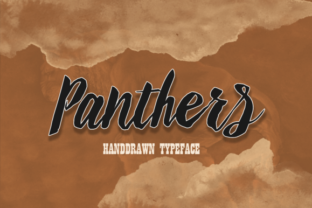
A hand-drawn font carries an implicit promise of authenticity. It says someone cared enough to ink it by hand, making it distinct from the sterile uniformity of purely vector typefaces. Panthers delivers on that promise with a bold, gritty texture and an intentionally irregular baseline. It’s the kind of typeface that feels almost tactile, as if you could reach out and smudge the ink. But this level of raw character comes with a specific set of responsibilities. If you’ve ever downloaded a script font only to find it looks messy in your layout, or if you’re unsure how a hand-lettered style fits your brand, this guide will help you navigate the nuances. Let’s walk through the critical considerations—from licensing to kerning to pairing—so you can wield Panthers with genuine confidence and intention.
The Imperfect Baseline: A Feature, Not a Flaw
The most immediately noticeable quality of Panthers is its hand-inked baseline. Unlike mechanical fonts that sit with robotic precision on a straight line, Panthers has a natural, rhythmic wobble. This is the soul of the font, mimicking the pressure and release of a human hand. The common mistake here is to judge this irregularity by the standards of a standard corporate script. Beginners often try to force it into perfectly rigid layouts, aligning every character to a strict grid, which completely neuters its organic appeal. The result looks forced, like a wild animal trying to fit into a cage.
A better approach is to embrace the baseline as a design element. Use generous white space around your text to give the font room to breathe and move. When laying out a poster, logo, or t-shirt design, let the natural rhythm of Panthers dictate the spacing rather than trying to correct it. If you are building a brand identity that values warmth, handcrafted quality, or authenticity, this imperfection is your greatest ally. If you require strict, uniform alignment for a formal corporate report, Panthers is simply the wrong tool for that job. Respecting what the font is designed to do will save you hours of frustration.
The Licensing Trap: What to Verify Before You Commit
This is perhaps the most overlooked detail, and it can have expensive consequences. You find Panthers, you fall in love with its bold, gritty aesthetic, and you purchase or download it. But have you checked the End User License Agreement (EULA)? A common assumption is that a standard personal license covers all commercial scenarios, specifically permanent branding assets like logos, or merchandise like t-shirts and greeting cards for resale. Many designers and small business owners have learned the hard way that using a font on a product line or as a company logo often requires an extended commercial or merchandise license.
The solution is simple and preventative. Before you even download the file, define your use case explicitly. Will you be using Panthers in a logo that will be trademarked? Will you print it on t-shirts, mugs, or posters for sale? Visit the foundry or marketplace where you are purchasing the font and read the licensing details carefully. Look for terms like “Commercial License,” “Merchandise License,” or “Desktop + Web Application.” Investing in the correct license for Panthers upfront is not an expense—it is protection. It secures your right to use the design without legal risk and ensures the creators are fairly compensated for their work.
Pairing Panthers Without Creating Visual Noise
Because Panthers is inherently bold and textured, it demands a specific kind of counterpart. The most frequent mistake is the “loud plus loud” fallacy—pairing Panthers with another gritty, highly decorative, or script-heavy font. The result is visual chaos. The eye has no resting place, and legibility plummets. This mistake is especially common in poster and t-shirt design, where creators want to maximize impact but end up with a cluttered, amateurish look.
Contrast Is Your Most Powerful Tool
Pair Panthers with a clean, neutral sans-serif like Open Sans, Lato, or Montserrat. Let Panthers handle the hero text—the headline, the brand name, or the central quote—while the neutral font manages subtext, body copy, or supporting information. This creates hierarchy and clarity.
Vintage Editorial Charm
For a more sophisticated, literary feel, pair Panthers with a classic serif like Playfair Display or Crimson Text. This combination works beautifully for book covers, brochures, or upscale invitations. The contrast between the gritty hand-drawn script and the refined serif creates a dynamic, professional tension.
A solid rule of thumb: limit yourself to one display font per project. Let Panthers be the star. If you find yourself wanting to use a second decorative typeface, step back and ask whether it genuinely adds value or just adds noise. Nine times out of ten, a quiet partner is the better choice.
Scale, Context, and Legibility: Know Where Panthers Excels
A frequent oversight is using Panthers in contexts where scale and background work against it. This font is a display typeface, meaning it is designed for impact at larger sizes. Using it for body text below 18 points is a recipe for illegibility. The gritty details blur together, and the irregular baseline makes lengthy paragraphs strain the eyes. Similarly, placing Panthers on a busy, heavily patterned, or photographic background often causes the texture of the font to get lost entirely.
Here is what works reliably: Use Panthers for headlines, logos, t-shirt graphics, greeting cards, posters, and short, punchy phrases. Give it a clean, solid backdrop to make the ink texture pop. Light pastels, crisp white, or deep solid colors with high contrast allow the font’s character to shine. Always test your design physically. What looks readable on a bright screen at 100% zoom may look very different when printed on a t-shirt or a poster at a distance. Ask a colleague to read it from across the room. If they squint, increase the size or simplify the background.
The Devil in the Details: Kerning and Tracking
Hand-drawn fonts, by their very nature, have uneven lateral spacing. That is part of their handcrafted charm, but it also demands a hands-on approach from the designer. The mistake is relying entirely on the default kerning provided with the font file. In a bold script like Panthers, certain letter pairs (like “AV,” “Wa,” or “Ty”) can feel awkwardly spaced or uncomfortably tight. Ignoring this can make an otherwise beautiful design look sloppy and unprofessional.
Manual kerning is a skill worth developing. In most design software (such as Adobe Illustrator, Photoshop, or even Canva in certain tools), you can click between individual letters and use keyboard shortcuts to nudge them closer or farther apart. For Panthers, pay special attention to pairs where open curves meet straight stems. Additionally, when using Panthers in all-caps settings—which can look incredibly bold and powerful—adding a slight amount of tracking (uniform letter-spacing) of +10 to +20 points can dramatically improve readability and give the text a more deliberate, designed feel. Do not leave the default spacing untouched. Invest the five minutes to fine-tune it, and the result will look custom-crafted.
Before You Buy: What to Verify in the Font File
Not all versions of a typeface are created equal. Before committing Panthers to a major project, take a few minutes to verify the quality and completeness of the font file itself. A practical checklist includes:
- Character Set: Does it support the characters you need? If your project requires international accents, specific punctuation, or numerals in a particular style, confirm these are included in the glyph palette.
- Alternate Glyphs and Ligatures: Many high-quality hand-drawn fonts include stylistic alternates or contextual ligatures. Using these can make your text look even more organic and custom, reducing the repetition of identical letter shapes.
- Font Format: Is it available in OTF, TTF, or WOFF? Ensure compatibility with your specific software, whether you are designing on a desktop application, a web platform, or a machine like a Cricut or Silhouette for physical products.
- Source Reputation: Purchase from reputable foundries or marketplaces. This guarantees you are getting the full, properly hinted version of the font and helps you avoid corrupted files or missing glyphs.
Taking these verification steps prevents workflow disruptions and ensures you are working with a professional-grade tool.
A Practical Framework for Using Panthers
Before you finalize your design, run through this quick checklist to ensure you are using Panthers in a way that honors its strengths and works around its limitations:
- Define the purpose: Is this for a short, high-impact element (headline, logo, single word)? Perfect. If it’s for a multi-page report or small body text, select a different typeface.
- Choose a partner: Have you selected a clean, neutral sans-serif or serif to support Panthers? If not, prioritize this step.
- Tweak the spacing: Have you manually kerned the most prominent text and added tracking for all-caps settings? Take the time to do it.
- Evaluate the background: Is the background simple enough to let the ink texture and baseline character shine? Adjust if necessary.
- Confirm your license: Is the license appropriate for your distribution and commercial needs? Review it one more time before launch.
By following this framework, you move from simply using a font to intentionally crafting a design.
Choosing a typeface like Panthers is an exciting step toward building a brand or project with real, tangible character. It is a tool built for impact, for warmth, and for standing out in a sea of predictable, sterile typography. By respecting its hand-drawn nature, understanding its technical needs, and giving it the right space and typographic partners, you unlock its full potential. Panthers is not just a font—it is a design element with a distinct voice. Use it intentionally, and it will speak volumes about the care and thought behind your work.