The Art of Handwritten Elegance: Understanding Swan's Fluid Calligraphy
Digital typography continues to evolve, offering creators an ever-expanding palette of expressive letterforms. Among the most captivating recent additions is Swan, a fluid calligraphy-inspired handwritten font crafted by designer Etewut. Unlike many script fonts that rely on rigid digital precision, Swan captures the organic rhythm and sweeping motion of a skilled calligrapher's hand. Its defining feature is a rich collection of alternate characters, each adorned with stunning swashes that transform ordinary text into a visual statement. This article explores what makes Swan distinctive, how its technical design benefits a wide range of users, and where it shines in real-world projects.
Design Philosophy: Where Calligraphy Meets Fluidity
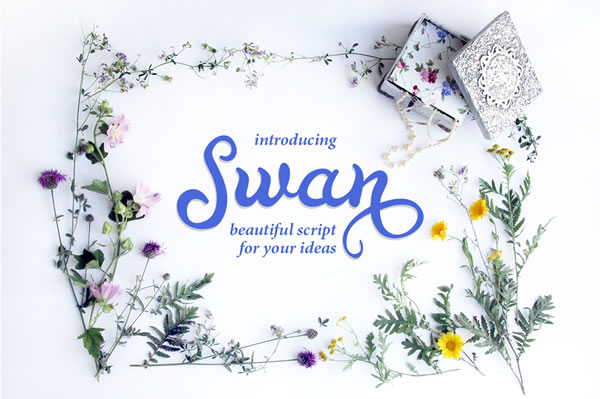
Swan is not merely a font; it is a digital interpretation of ink-on-paper calligraphy. Etewut's design emphasizes continuous, flowing strokes that mimic the natural pressure and release of a nib. The result is a typeface that feels alive, with varying stroke weights and graceful loops. What sets Swan apart is its set of awesome alternate characters. These are not simple stylistic variants but carefully crafted swashes — extended flourishes, delicate tails, and ornamental loops — that can be substituted for standard letters to create custom, ornate typography. For instance, the capital 'A' might include a sweeping lower stroke that curls beneath the following word, while a lowercase 'e' can end with an elegant upward flick. This level of detail elevates Swan from a functional font to a design tool for crafting unique lettering art.
Technical Excellence: PUA Encoding and Universal Compatibility
One of the most practical advantages of Swan is its PUA (Private Use Area) encoding. This means the alternate characters and swashes are mapped to Unicode codepoints that are not typically used for standard text. Why does this matter? Because PUA encoding ensures that these special glyphs are accessible in virtually any application that supports font utilities — without needing specialized software. Users can access Swan's alternates through the Glyphs or Character Map panel in programs like Microsoft Word, Adobe Illustrator, or even simpler tools like Cricut Design Space and PicMonkey. The font works seamlessly across platforms, from Windows and macOS to web-based design interfaces. For crafters using Silhouette Studio or Cricut Design Space, Swan opens up possibilities for intricate vinyl decals, personalized cards, and custom apparel. Educators and researchers can incorporate its handwritten elegance into presentations or classroom materials without worrying about compatibility hurdles.
Versatile Applications: From Invitations to Branding
Swan's aesthetic appeal makes it a natural choice for projects that require a personal, artistic touch. Below are several contexts where the font excels, along with practical observations from designers and hobbyists.
1. Wedding Invitations and Formal Stationery
The fluid lines and ornate swashes make Swan ideal for wedding suites, save-the-dates, and thank-you notes. Using the alternate characters, a designer can create a customized monogram or a headline that appears hand-lettered. For example, substituting the standard 'W' with a swash variant that trails into a decorative curl adds a layer of sophistication that standard scripts cannot match. Many users report that Swan reduces the need for additional ornamental vectors, as the font itself provides enough flourish to fill a design.
2. Logo Design for Small Businesses
For entrepreneurs and branding professionals, a distinctive logotype is essential. Swan offers a balance between legibility and artistry. A coffee shop, boutique, or art studio can use the font to convey warmth and craftsmanship. The alternate characters allow for a unique wordmark — perhaps extending the descender of a 'y' into a graceful loop or adding a swash to an initial letter. Because the font is PUA encoded, designers can easily export these custom glyphs directly from the character map into their vector editing software.
3. Social Media Graphics and Content Creation
In the world of Instagram posts, Pinterest pins, and YouTube thumbnails, standing out requires visual flair. Swan works beautifully for quotes, titles, and call-to-action text. Its handwritten quality contrasts well with clean sans-serif body fonts. Content creators can combine a swashed headline with a simple background to create an elegant, professional look. The font's natural rhythm also works for short phrases in videos, where the flowing letters complement a calm or inspirational tone.
4. Crafting and DIY Projects
Hobbyists using Cricut or Silhouette machines will appreciate Swan's well-defined paths. The strokes are thick enough to cut cleanly from vinyl or cardstock, yet the swashes remain delicate enough for intricate designs. A common use case is creating personalized mugs, t-shirts, or home decor with names or short messages. Because the font includes multiple alternates, each project can have a slightly different look — no two letters need be exactly the same.
Comparing Swan to Other Script Fonts
Many handwritten fonts offer a single set of characters with occasional ligatures. Swan differentiates itself by the sheer number and quality of its alternates. While fonts like 'Lavanderia' or 'Great Vibes' are beautiful, they often lack the extensive swash collection that Swan provides. Moreover, Swan's strokes are notably fluid — the transitions between thick and thin are smooth, avoiding the digital harshness found in some competitors. Users transitioning from a font like 'Pacifico' will notice Swan's more formal calligraphic structure, making it suitable for both casual and upscale projects. However, Swan's distinct character means it may not be appropriate for every context; its swashes can become overwhelming in long blocks of small text. Designers should reserve it for headings, short phrases, or as a display typeface.
Practical Tips for Using Swan Effectively
To maximize the font's potential, keep the following considerations in mind:
- Access the alternates: In most design programs, you can open the Glyphs panel (often found under "Window" > "Type" > "Glyphs") to browse and insert alternate characters. In Cricut Design Space, you may need to use the special character feature or a separate character map tool.
- Pair with a simple sans-serif: Because Swan is ornate, it pairs best with minimal fonts like Montserrat, Roboto, or Lato for body text. This creates a clear hierarchy and prevents visual clutter.
- Adjust tracking and leading: Swashes extend beyond the bounding box, so you may need to increase spacing between lines (leading) and between letters (tracking) to avoid collisions.
- Test for legibility at small sizes: While Swan is designed for display purposes, it remains readable at moderate sizes. For projects like small labels or tiny invites, test a print sample to ensure the swashes don't obscure the letterforms.
- Use lowercase alternates sparingly: The lowercase set also includes swash variants, but overusing them can make text appear messy. Reserve swashes for initial letters or final characters for maximum impact.
Considerations and Potential Limitations
No font is perfect for every scenario, and Swan is no exception. Its ornamental nature means it requires careful use. In professional branding, the swashes may conflict with minimalist design guidelines. Additionally, because the font relies on PUA encoding, some older or less advanced software may not display the alternates correctly — always check compatibility before finalizing a project. For researchers or educators creating scientific posters or handouts, Swan's decorative style may be inappropriate for data-heavy content. That said, for creative professionals, crafters, and small business owners seeking a distinctive, flexible script font, Swan offers a compelling blend of artistry and technical convenience.
Unlocking Creative Potential with Swan
What sets Swan apart is the freedom it gives users to explore their own typographic voice. The alternates and swashes are not fixed — they invite experimentation. A wedding planner might use a different swash 'T' for each invitation set, creating a sense of handmade uniqueness. A logo designer could combine two alternate forms of the same letter to build a custom mark. Even without advanced design skills, anyone with access to a character map can add a touch of calligraphic elegance to their work. As digital tools continue to democratize design, fonts like Swan remind us that the art of handwritten letters still holds immense power to communicate emotion, care, and beauty.
Whether you are a professional graphic designer, a small business owner, a teacher creating classroom materials, a hobbyist with a Cricut machine, or simply someone who loves beautiful lettering, Swan provides an accessible pathway to elevated typography. Its fluidity, its technical compatibility, and its rich set of alternates make it a standout choice in the crowded world of script fonts. By understanding its strengths and limitations, you can wield Swan to add a touch of handcrafted elegance to any project.