Middle Management: A Typeface Built for Structure, Clarity, and Real Workflows
There is a quiet tension at the heart of most design work. You want something that looks intentional, but not stiff. You want personality, but not at the cost of readability. You want a typeface that feels like it belongs in a professional setting, yet does not disappear into the background. That tension is exactly where Middle Management, a font created by Jeff Bensch, lives.
Middle Management is not a decorative novelty face. It is not a playful script or a delicate serif designed for literary anthologies. It is a utilitarian, geometric, slightly assertive typeface that draws on the visual language of mid-century corporate identity, bureaucratic forms, and organizational charts. It is a font that understands hierarchy. It knows who reports to whom. And when you use it, your layout inherits that same sense of order.
If you have ever struggled to make a header feel authoritative without becoming aggressive, or tried to build a consistent visual system across slides, documents, or web assets and ended up with something that felt scattered, Middle Management is worth a serious look. This article walks through what the font is, where it fits in a broader design or content workflow, and how you can integrate it into your own projects with confidence.
What Middle Management Actually Is
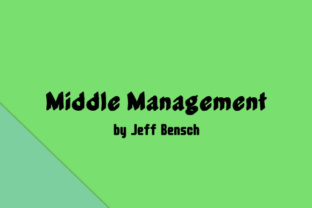
Jeff Bensch designed Middle Management as a display typeface with strong geometric bones. The letterforms are constructed with straight lines, consistent stroke weights, and tightly controlled curves. There is very little calligraphic influence here. Instead, the font draws inspiration from architectural lettering, stencil forms, and the kind of no-nonsense typography you might find on a vintage office door or a factory control panel.
The weight distribution is even. The x-height is relatively large, which gives it excellent legibility at display sizes. The capitals are commanding without being overbearing. The lowercase letters maintain the same structural logic, which means you can mix cases without breaking the visual rhythm.
What sets Middle Management apart from other geometric sans-serif fonts is its attitude. It is not trying to be friendly. It is not trying to be elegant. It is trying to be clear. That clarity comes from the meticulous spacing and the deliberate absence of decorative flourishes. Every character earns its place. There is no wasted line.
This makes Middle Management a strong candidate for anyone who needs to communicate structure, authority, or process. If your work involves explaining systems, laying out hierarchies, or presenting information that demands attention, this font becomes a functional asset rather than just aesthetic decoration.
Where Middle Management Fits in a Real Workflow
Typography is never just about picking a pretty font. It is about choosing a tool that supports the task at hand. Middle Management slots into a workflow at several key points, depending on what you are producing and what kind of tone you need to strike.
Before the Project: Planning and Structuring Content
When you are in the early stages of a project, you are dealing with raw information. Outlines, wireframes, content inventories, and hierarchy maps. Middle Management can serve as a structural typography choice for those planning documents themselves. Because the font is so clean and grid-friendly, it helps you see relationships between elements before you even get into final design.
Try using Middle Management for headers in your project briefs, style tiles, or content outlines. The visual clarity translates into mental clarity. When your planning documents look organized, you are more likely to think organized. That might sound like a small thing, but anyone who has ever fought through a messy project brief knows how much time it wastes.
During the Project: Creating Assets That Need Authority
The most natural place for Middle Management is in the production phase. If you are designing a presentation deck, a set of internal documents, a brand guidelines PDF, a dashboard interface, or even a physical sign, Middle Management communicates that someone is in charge.
It works especially well in environments where you need people to follow a process. Training materials, standard operating procedures, safety signage, and workflow diagrams all benefit from a typeface that looks like it means business. The font does not whisper. It states.
For digital work, Middle Management holds up well at mid-to-large sizes. Use it for headings, subheadings, pull quotes, and key data labels. Avoid using it for long body copy at small sizes. That is not what it was built for. Pair it with a neutral, highly readable text face such as a clean sans-serif or a sturdy slab serif for paragraphs.
After the Project: Reviewing and Presenting Outcomes
Once a project wraps up, you often need to present results. That could be a client presentation, an internal retrospective, or a case study published on your website. Using Middle Management in the summary document or presentation deck reinforces the idea that the work was handled with rigor. It lends a sense of finality and professionalism.
If you publish case studies, white papers, or process documentation publicly, the font can become part of your visual brand. It signals to readers that you value structure and clarity.
How Middle Management Interacts with Other Tools and Resources
No typeface works in isolation. Middle Management interacts with the rest of your toolkit in specific ways that you need to plan for.
Pairing with Other Fonts
The best pairings for Middle Management are fonts that handle the jobs it does not. Since Middle Management excels at display sizes and authoritative headers, you want a body font that is easy on the eyes for extended reading. A neutral sans-serif like Inter, Work Sans, or Source Sans works well. If you prefer something with more texture, a sturdy serif like IBM Plex Serif or Source Serif creates a nice contrast between the geometric headers and the more traditional body text.
Avoid pairing Middle Management with another highly geometric or assertive display font. You will end up with visual competition. Let Middle Management be the voice of authority, and let your body font handle the conversation.
Compatibility with Design Software
Middle Management is available in standard font formats, so it works across major design tools. Whether you are working in Adobe Illustrator, Figma, Sketch, Affinity Designer, or even Canva (assuming you can upload custom fonts on your plan), the font behaves predictably. The spacing is well-tuned out of the box, so you will not need to spend excessive time kerning manually.
For web use, Middle Management can be self-hosted or loaded via a service if the license allows. Use it for headlines, navigation labels, hero text, and call-to-action buttons. Because of its strong presence, it works well for single-word hero headers or short impactful phrases.
Sizing and Spacing in Practice
Start with Middle Management at 36 points or larger for headings. At these sizes, the geometric precision of the letterforms becomes an asset. The even stroke weights create a consistent texture that draws the eye without needing bold colors or heavy decoration.
For subheadings, 18 to 24 points usually works, depending on the medium. Keep the tracking (letter-spacing) at zero or slightly negative. The font is already tight by design, so adding extra space can make it feel disconnected. If you need to open it up, add small increments of positive tracking and test the visual effect at your target size.
Do not use Middle Management for body text smaller than 14 points in print or 16 pixels on screen. Below those thresholds, the tight spacing and geometric forms start to feel cramped, and readability suffers.
Internal Business Documents
If you are responsible for creating templates for your organization, Middle Management can bring consistency to documents that often look rushed or mismatched. Use it in the header area of your Word, Google Docs, or Notion templates. Apply it to section titles, table headers, and sidebar labels. Over time, employees will associate the font with organized, authoritative information, which can subtly improve how internal communications are received.
Marketing and Sales Materials
For landing pages, one-pagers, and pitch decks, Middle Management works best when you need to make a bold statement quickly. Use it for the main headline and perhaps one supporting subhead. Let the rest of the content breathe in a complementary body font. The contrast between a strong headline and clean body text creates a natural reading hierarchy.
If you run A/B tests on headlines, try Middle Management against your current font. You might find that the visual authority translates into higher engagement, especially for audiences in professional or B2B contexts.
Educational and Training Content
Course materials, slide decks, and handouts benefit from a clear typographic hierarchy. Use Middle Management for module titles, key takeaways, and important definitions. Students and trainees often scan materials before reading them. A font that signals importance helps them prioritize attention.
Personal Projects and Creative Work
Middle Management is not only for corporate use. If you are a blogger, newsletter writer, or content creator, you can use it for your site headers, episode titles, or brand marks. It brings a grounded, confident feel to personal brands. It says that you take your work seriously without needing to shout.
For hobbyists working on zines, posters, or personal branding, the font gives a professional anchor to projects that might otherwise feel too casual. Even a simple quote card or social media graphic gains structure when set in Middle Management.
Usability, Organization, and Long-Term Consistency
One of the strongest arguments for adopting Middle Management is the consistency it brings to your visual system over time. When you standardize on a typeface for headers across projects, your work starts to cohere into a recognizable body of output. Clients, colleagues, and audiences begin to associate the visual language with you.
Font management becomes simpler when you have a clear primary display face. You stop hunting for new headlines fonts every project. You stop second-guessing whether a given font carries the right weight. You just open the project, apply Middle Management to the headers, and move on to the actual work.
That efficiency compounds. Over a year, the hours saved on typeface selection, testing, and tweaking add up. And the output is more consistent because the visual anchor remains stable.
From a quality control perspective, Middle Management is forgiving. Its geometric structure means it looks good even when output conditions are not ideal. It reproduces well in black and white, survives low-resolution printing, and remains legible on screens with variable calibration. That robustness matters when your work travels across platforms and formats.
Observations from Real Use
People who use Middle Management consistently report the same pattern. Initially, they are drawn to its aesthetic. It looks clean and confident. But the real value appears after the third or fourth project. By then, they have stopped thinking about the font at all. They just set the header and it works. The typeface fades into the background of the workflow, doing its job without demanding attention.
That is the hallmark of a well-designed tool. It does not require constant adjustment. It does not fight your intent. It supports the structure you are trying to build.
If you are still experimenting with fonts and looking for something that can serve as a reliable anchor for your display typography, Middle Management deserves a place in your library. It works across personal and professional contexts. It pairs well with common body fonts. It reproduces consistently. And it brings a sense of process and intentionality to anything you put it on.
The next time you sit down to lay out a document, a slide deck, or a landing page, ask yourself what kind of voice you want. If the answer is clear, authoritative, and unapologetically structured, you already know which font to reach for.