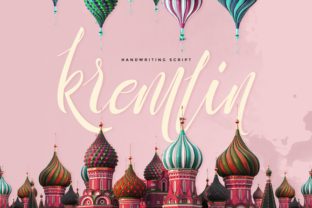
Kremlin: A Freestyle Handwriting Font with Personal Charm
In the world of design, choosing the right typeface can make or break a project. While standard fonts offer reliability, they often lack the distinct voice that makes a design memorable. Enter Kremlin, a fresh and modern handwriting font created by Ease Type. This freestyle script stands out for its authentic, handcrafted feel, offering a versatile tool for anyone looking to add a genuine personal touch to their work. Whether you’re a professional designer, a business owner, or someone creating a one-off invitation, understanding what makes Kremlin unique can help you decide if it’s the right fit for your next project.
What Is Kremlin?
Kremlin is a freestyle handwriting font developed by Ease Type. Unlike rigid, formal scripts, Kremlin captures the spontaneity of natural handwriting. It blends smooth, flowing strokes with slight variations in letterforms, giving it the appearance of someone writing quickly with a favorite pen. The font is designed to feel both contemporary and approachable, making it suitable for a range of creative applications. It comes in a single style but includes a variety of ligatures and alternate characters that mimic the irregularities of human writing, adding authenticity to every word you type.
Key Characteristics of Kremlin
- Freestyle look – Letters are not perfectly uniform, which creates a natural, organic feel.
- Modern yet warm – The design avoids being overly ornate or old-fashioned, striking a balance between trendy and timeless.
- Versatile weight – It has a moderate thickness that reads well at both small sizes for text and larger sizes for headlines.
- Contextual alternates – The font automatically adjusts letter shapes based on surrounding letters, so each word looks like it was written by hand.
- Full compatibility – Kremlin works seamlessly across all major design software, including Adobe Creative Suite, Canva, Microsoft Office, and more.
Why Choose Kremlin for Your Projects?
The value of a font lies in what it helps you communicate. Kremlin excels at conveying warmth, authenticity, and a personal connection. In an era where digital communication can feel cold and impersonal, using a font that mimics genuine handwriting immediately humanizes your content. Here are some specific reasons why Kremlin stands out as a practical choice.
1. It Adds a Human Touch
Whether you’re designing a greeting card, a logo for a local coffee shop, or a social media post, the goal is often to make the audience feel something. Kremlin’s irregularities—like slightly varying letter widths and natural slant—make text look like it was written just for that moment. This is especially powerful for brands that want to be perceived as friendly, creative, or down-to-earth.
2. Versatile Across Many Software Platforms
As stated by its designer, Kremlin is fully compatible with all types of software. This means you can download the font once and use it in Photoshop, Illustrator, InDesign, Word, PowerPoint, Keynote, and even web design tools. There is no need to worry about format issues or missing characters. This cross-platform compatibility saves time and frustration, especially when working on team projects or sharing files with clients who may use different programs.
3. Suitable for Both Digital and Print
Handwriting fonts sometimes suffer from low legibility in print or on screen. Kremlin maintains a clean readability without sacrificing its hand-drawn character. It works beautifully for invitations, wedding stationery, menu headers, posters, website banners, and even short blog titles. The font’s moderate stroke thickness ensures it remains legible at smaller sizes, while its expressive curves shine when enlarged.
4. Great for Personal Branding
Business owners and solopreneurs often struggle to find a font that reflects their unique personality without looking amateurish. Kremlin offers a professional yet approachable look. Use it in your logo, email signatures, or promotional materials to create a consistent brand voice that feels authentic. For example, a freelance illustrator could use Kremlin for their website headers, while a wedding planner might use it in their client proposals and save-the-date samples.
Real-World Applications of Kremlin
Understanding how people actually use Kremlin can help you picture yourself working with it. Below are several common scenarios where this font makes a noticeable difference.
Event Invitations and Stationery
Imagine designing a wedding invitation. You want it to feel intimate and romantic without being overly formal. Kremlin works perfectly for the couple’s names or the main “You are invited” headline. Combine it with a simple serif or sans-serif body text for contrast. The same applies to birthday parties, baby showers, or even corporate event save-the-dates where a more elegant touch is desired.
Social Media Graphics
Instagram and Pinterest thrive on visually appealing content. A quote graphic set in Kremlin looks like it was hand-lettered, drawing attention and encouraging saves and shares. Many content creators use handwriting fonts for their story highlights cover icons or for the main text on promotional posts. Because the font feels personal, it can increase engagement with your audience.
Restaurant & Café Menus
If you’ve ever seen a menu scribbled on a chalkboard, you know the appeal of hand-drawn type. Kremlin can recreate that effect digitally. Use it for section headings like “Appetizers” or “Handcrafted Cocktails,” and pair it with a legible sans-serif for the descriptions. This is especially effective for businesses that emphasize artisanal, homemade, or organic offerings.
Logo and Brand Identity
While not every logo should use a handwriting font, those with a creative or personal brand story often benefit from the authenticity Kremlin provides. A children’s book author, a handmade soap maker, or a calligraphy instructor could all use Kremlin as a primary logo typeface. Accompany it with a clean secondary font for versatile use across different media.
Strengths and Considerations
No font is perfect for every job. Here is a balanced look at what Kremlin does well and where you might need to be cautious.
Strengths
- Natural appearance – The freestyle design avoids looking repetitive or mechanical, which is a common issue with simpler handwriting fonts.
- Wide software support – Works in all standard design applications without extra configuration.
- Readable at various sizes – Maintains legibility from 10 pt up to very large display sizes.
- Good for short headlines – Best for a few words or a line of text, where its personality can shine without overwhelming the reader.
- Contemporary style – Not too trendy or too classic, making it a safe choice for projects that need to feel current without dating quickly.
Considerations and Limitations
- Not ideal for long body text – Like most handwriting fonts, reading an entire paragraph set in Kremlin can be tiring. Use it for titles, subtitles, or short callouts instead.
- May need spacing adjustments – Depending on the software or context, you might need to tweak tracking (letter spacing) to avoid characters feeling too cramped or too loose.
- Single weight – Kremlin is available in one weight only, which limits your ability to create hierarchy within the same typeface. You’ll need to pair it with other fonts for variety.
- Not suitable for very formal contexts – Because of its casual, handwritten nature, Kremlin might not be the best choice for legal documents, corporate annual reports, or other situations requiring strict formality.
How to Evaluate If Kremlin Suits Your Project
Choosing a font should be a practical decision, not just a stylistic whim. Here is a simple framework you can use to determine whether Kremlin is right for your needs.
- Identify the mood – Do you want your design to feel friendly, personal, and approachable? If yes, Kremlin is a strong candidate.
- Assess the reading length – Will people need to read large blocks of text? If so, consider using a more readable body font and reserving Kremlin for accents.
- Test the size – Try the font at different point sizes in your design software. See how it looks at the actual scale you’ll be using (business card vs. poster).
- Pair with a neutral font – Kremlin pairs well with simple sans-serifs like Montserrat, Open Sans, or Lato. The contrast helps the handwriting stand out while keeping the overall design balanced.
- Check compatibility – Since Kremlin is fully compatible with all software, this step is already covered—but always preview the font in the specific application you’ll use.
Who Benefits Most from Using Kremlin?
While anyone can use Kremlin, certain groups tend to get the most value from its characteristics.
- Graphic designers and illustrators – Adding a natural hand-lettered element to digital work saves time compared to hand drawing each word.
- Small business owners – For branding on a budget, a standout font like Kremlin can replace expensive custom lettering.
- Event planners – Invitations, place cards, and signage benefit from the personal feel.
- Social media managers – Quick, visually rich graphics become more engaging with a script font that appears handcrafted.
- Hobbyist creatives – Anyone making cards, crafts, or scrapbooking projects will appreciate how Kremlin transforms ordinary text into a personal statement.
Practical Tips for Getting the Most Out of Kremlin
To use Kremlin effectively, keep these experience-based suggestions in mind.
- Use ligatures – Enable OpenType features in your software to see automatic letter connections, which enhance the handwriting effect.
- Adjust the color – A softer color (like a warm gray or muted pastel) can make Kremlin look even more like real ink on paper.
- Layer it – Try placing Kremlin on a subtle paper texture or behind a transparent overlay to mimic the tactile feel of handwritten notes.
- Keep it short – As a rule of thumb, keep text strings under 15–20 words when using Kremlin as the primary typeface.
- Combine with a contrasting style – Pairing modern script with a monospace or geometric sans-serif creates visual interest and hierarchy.
Final Thoughts
Kremlin from Ease Type is more than just another handwriting font. It is a thoughtful freestyle script that brings warmth, personality, and a contemporary edge to a wide range of projects. Its full software compatibility and careful design make it a practical addition to any designer’s toolkit. While it works best in short bursts rather than lengthy paragraphs, its ability to humanize digital content is unmatched. Whether you are crafting a logo, designing a wedding suite, or posting on social media, Kremlin offers a way to communicate with a personal voice that readers can feel. Consider your project’s mood, length, and context, and you’ll quickly see if this font fits naturally into your creative palette.