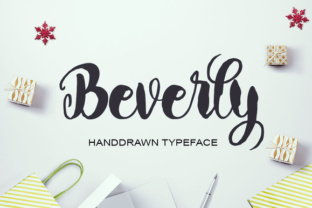
Beverly: A Handdrawn Typeface That Deserves a Thoughtful Approach
You have probably seen Beverly in action—on a trendy poster, a stylish T-shirt, or a wedding invitation that feels personal and modern. This digitally created handdrawn typeface is beautiful, with thick, smooth letters that are both distinctive and highly readable. Its modern, friendly character makes it a natural choice for a wide range of projects: logos, labels, letterheads, cards, and nearly anything else you can imagine. But like any tool, using Beverly effectively requires more than just downloading it and typing away. Many people—beginners and professionals alike—make mistakes that diminish the font’s impact, waste time, or lead to disappointing results. In this article, I’ll walk through the most common pitfalls and show you how to use Beverly the right way, so your projects look polished, communicate clearly, and stand out for the right reasons.
Mistake #1: Using Beverly for Every Tone and Audience
Because Beverly is so versatile, it is tempting to use it for nearly every project. But that can backfire. The handdrawn, playful character of the font may clash with serious, corporate, or highly formal settings. Imagine a law firm’s letterhead set in Beverly—the thick, casual letters might undermine the trust and professionalism the firm wants to project. The result is a mismatch that confuses the audience or weakens your message.
Better approach: Reserve Beverly for brands, events, and materials where a friendly, creative, or approachable tone is a strength. It works beautifully for wedding invitations, creative agency logos, hobbyist product labels, or blog headers. If you must use it in a more formal context, pair it with a clean serif or a neutral sans-serif body font to balance the informality. For example, use Beverly for the company name on a business card, but set contact details in a simple geometric sans such as Montserrat or Graphik. That way you get the best of both worlds: a memorable, handcrafted identity without sacrificing readability or professionalism.
Mistake #2: Overlooking Readability in Long Text Blocks
Beverly’s thick strokes and rounded forms make it very legible at display sizes, but that same quality can become a liability in long paragraphs. The letters are weighty and occupy more space per character than many text fonts. Setting an entire article, product description, or email body in Beverly can cause eye fatigue, slow reading speed, and make the layout feel cramped.
Practical advice: Use Beverly primarily for headlines, short phrases, pull quotes, and call-to-action buttons. For longer text, choose a complementary companion font. A lightweight, high-contrast sans serif like Inter or a readable slab serif like Zilla Slab often works well alongside Beverly. Test your layout at actual reading distance—if the paragraph feels heavy or difficult to scan, switch the body to a lighter font and let Beverly shine where it belongs.
Mistake #3: Ignoring Spacing and Kerning Adjustments
Many handdrawn typefaces, including Beverly, come with default letter spacing that may be wider or more uneven than mechanical fonts. This is part of its charm, but it can also cause readability issues if not adjusted for your specific use case. The thick strokes sometimes touch each other in unexpected ways, especially in all‑caps settings or when letters like “A” and “V” are adjacent.
What to check before you finalize a design: In your design software (Adobe Illustrator, InDesign, Figma, Canva, or even Microsoft Word), increase the tracking slightly if letters appear too tight. Also inspect pairs like “AV”, “Te”, “To”, “Lo”, and “Wy”. If they collide, add a tiny amount of manual kerning. For large sizes, such as posters or logos, the spacing issues become more obvious—so zoom in and adjust until the rhythm looks intentional rather than accidental. Creating a clean, deliberate spacing preserves the handdrawn feel while making your design look professional.
Mistake #4: Downloading Beverly from Unreliable Sources
Beverly is available on many font marketplaces—some official, some not. Beginners often grab the first free link they find, which may contain incomplete character sets, missing ligatures, or even malware. Others buy a version that lacks the specific file format they need, such as OTF for print or WOFF2 for web.
How to avoid this: Purchase Beverly from reputable platforms like MyFonts, Creative Market, or the original designer’s website. Always check the license before buying. If you plan to use the font in commercial projects (logos, product packaging, T‑shirts for sale), ensure you have a commercial license. Free versions are often personal-use only and can lead to legal issues down the road. Download all available file formats (OTF, TTF, WOFF, WOFF2, SVG) to ensure compatibility across print, web, and mobile. If a seller offers sample characters, test them at different sizes before committing.
Mistake #5: Forgetting to Test Beverly on Actual Output Media
What looks perfect on your screen might look different on a printed T‑shirt, a laser‑cut wooden sign, or a website background. Thick strokes like Beverly’s can become muddy when printed on absorbent paper or fabric. On screens, low‑resolution monitors might cause the letters to appear jagged or uneven.
A practical testing routine: Always print a sample at full size before you finalize a poster or label. For T‑shirt designs, simulate the fabric type in your graphics software (or print a mockup) to see how the thick lines hold up. For web use, view the font on both high‑DPI (Retina) and standard displays. If you are using Beverly for a logo, test it in black and white, in reverse (white on dark), and at very small sizes (e.g., business card scale). The thick strokes can sometimes fill in and lose detail below 12pt. If that happens, consider scaling up or adding a small gap between strokes.
Mistake #6: Assuming One Weight Fits All Projects
Many handdrawn typefaces, including Beverly, are released in a single weight (usually Regular). This can create problems when you need hierarchy within a design. For example, if your poster has a main headline and a subheading, both in the same weight, the hierarchy may flatten. Beginners sometimes try to fake a lighter weight by scaling the font down, but that only makes the strokes thinner proportionally, which can distort the intended look.
Better choices: If Beverly comes only in one weight, create hierarchy through size, color, and spacing rather than a second weight. Alternatively, combine Beverly with a similar handdrawn font that offers multiple weights, or use it only for the main focal point and choose a contrasting font for secondary elements. Some designers also recommend using Beverly in all caps for emphasis and sentence case for secondary lines—this subtle change can help structure the message without needing a different weight.
Mistake #7: Neglecting Contrast with Backgrounds and Colors
Beverly’s thick lines are most striking when there is strong contrast with the background. A common error is to set Beverly in a light color on a light background, or in a dark color on a dark textured background. The letters, despite their weight, can become hard to read or lose their handdrawn character. Another issue: using busy patterns beneath Beverly can cause the strokes to blend into the design.
What to check before you export: Ensure sufficient luminance contrast between the font and its background. A simple test: convert your design to grayscale and see if Beverly still reads clearly. For best results, place Beverly on a solid, neutral background. If you want a patterned background, keep it subtle and low‑contrast, or add a semi‑transparent shape behind the text to make the letters pop. For print, avoid very glossy paper if you set light‑colored Beverly—the reflection can wash out the strokes.
Final Advice: Treat Beverly as a Partner, Not a Solo Act
Beverly is a gorgeous, modern handdrawn typeface that can elevate countless creative projects—from wedding invitations and T‑shirts to logos and labels. But its success depends on how well you match it to your audience, control spacing, test on real media, and pair it with other fonts. The designers who get the best results from Beverly are those who treat it with the same care as a custom illustration: they choose the right moment for it, adjust details meticulously, and respect its strengths and limitations. By avoiding the common mistakes covered here, you will save time, reduce frustration, and produce work that feels intentional, readable, and professional. Next time you open a new project in your favorite design tool, consider Beverly as one option among many—and when it fits, use it wisely.