Golden Brush: The Handmade Calligraphy Font That Redefines Shiny Text Effects
Typography has always been about more than just readability. It is about personality, emotion, and visual impact. Among the many typefaces available today, few manage to capture the warmth of hand-lettered artistry while also offering a genuinely innovative technical feature. Golden Brush does exactly that. This handmade calligraphy font brings a tactile, human quality to digital design, but what truly sets it apart is its clever dual-font system that produces a luminous, highlight effect with remarkable ease.
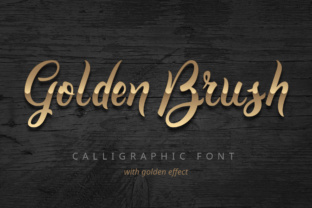
When you first encounter Golden Brush, the handwritten elegance draws you in. The strokes feel fluid, natural, and deliberate, as if created with a real brush on textured paper. But the real magic happens when you discover the companion font included in the set. This second typeface contains only the top half of each letter. By layering these two fonts on top of one another and assigning a different color to the top layer, you instantly create a shiny, metallic, or glossy text effect that looks sophisticated rather than gimmicky.
How the Dual-Font Layering System Works
The concept is deceptively simple, but the execution is what makes Golden Brush so powerful for designers who want to add polish to their projects without spending hours on manual highlighting. The base font contains the complete letterforms, rendered in the signature handmade calligraphy style. The companion font, often labeled as the Highlights version, includes only the upper portion of each character. When these two are stacked precisely on top of each other, the highlight font acts as a reflective sheen across the top half of every letter.
To achieve the effect, you place the highlight font directly over the base font using the same size and positioning. Then you change the color of the highlight layer to something lighter, brighter, or even metallic, such as gold, silver, white, or a pastel tint. The result is a two-tone letter that appears to catch light along its upper edge. This mimics the natural way light interacts with raised, glossy, or metallic surfaces, giving your text a three-dimensional quality that flat typography simply cannot match.
What makes this approach so practical is that you do not need advanced vector editing skills or custom gradient creation. Anyone comfortable with basic text layering in design software can produce professional-looking results in minutes. This accessibility opens up high-end typographic effects to a much wider range of creators, from social media managers to small business owners who want their branding to stand out.
The Handmade Calligraphy Aesthetic
Beyond the highlight feature, the core design of Golden Brush deserves attention. Handmade calligraphy fonts have grown enormously in popularity because they offer something that standard serif and sans-serif typefaces cannot: a sense of human presence. Each letter carries slight irregularities, varied stroke widths, and organic curves that make digital text feel personal and approachable.
Golden Brush achieves this with particular grace. The letterforms are not overly ornamental or difficult to read, which is a common pitfall with script fonts. Instead, they strike a balance between artistic expression and legibility. The brush strokes have a natural taper, with thicker downstrokes and lighter upstrokes that create rhythm and movement across the page. This makes the font suitable for both short headlines and longer passages where you want to maintain a warm, inviting tone.
The handmade quality also means that Golden Brush works beautifully in contexts where authenticity matters. Wedding invitations, greeting cards, inspirational quote graphics, boutique branding, and artisanal product labels all benefit from a typeface that feels crafted rather than mechanical. When you add the highlight effect on top, you elevate that handcrafted feel with a touch of luxury and refinement.
Practical Applications in Modern Design Workflows
Modern designers work across a diverse range of media, and Golden Brush adapts well to most of them. In print design, the layered font effect can be used for business cards, brochures, posters, and packaging. The shiny highlight adds a premium finish that mimics foil stamping or embossing without the production cost. For digital designers, the same technique works beautifully in social media graphics, website headers, email newsletters, and video titles.
One particularly effective use case is in branding for lifestyle and beauty industries. A cosmetics brand, for example, might use Golden Brush for product names or taglines, with the highlight layer in a soft gold or rose gold to suggest luxury and radiance. A wedding planner could use the font for invitation suites, layering a soft champagne tone over a deeper blush base to create an elegant, romantic look. The versatility comes from the fact that you can choose any two colors for the base and highlight layers, allowing you to match any brand palette or design theme.
Social media content creators also find value in Golden Brush because it helps their text stand out in crowded feeds. The shiny effect catches the eye and conveys a polished, professional aesthetic. Whether you are designing Instagram stories, YouTube thumbnails, or Pinterest pins, the layered typography adds a level of detail that signals quality and care.
Tips for Achieving the Best Shiny Text Effect
Getting the most out of Golden Brush requires attention to a few key details. First, color selection matters significantly. The base font should be a darker or more saturated version of your chosen hue, while the highlight layer should be lighter and often with a hint of warmth or coolness depending on the mood you want. For a classic gold effect, use a deep amber or bronze as the base and a bright yellow-gold as the highlight. For silver, pair a cool gray base with an icy white highlight.
Second, consider the background. The highlight effect is most visible on solid or subtly textured backgrounds. Busy patterns can compete with the layered text and reduce the impact of the shiny effect. A dark background makes the highlight pop dramatically, while a light background allows for a more subtle, elegant sheen.
Third, spacing and alignment are crucial. Because the highlight font contains only the top half of each letter, it must align perfectly with the base font. Most design software allows you to duplicate text layers and nudge them into exact position. Taking an extra moment to ensure precise alignment will make the difference between a clean, professional result and one that looks off.
Another useful technique is to experiment with opacity and blending modes. Reducing the opacity of the highlight layer slightly can create a softer, more realistic sheen. Overlay or Screen blending modes in software like Photoshop or Affinity Designer can also produce interesting variations that mimic different lighting conditions.
Why Designers Choose Layered Font Systems Like Golden Brush
The appeal of a layered font system extends beyond the visual result. There is also a practical efficiency that comes from having the highlight built into the typeface itself. Traditionally, creating a shiny text effect meant manually drawing highlights, applying gradients, or using complex layer styles. These methods are time-consuming and often require adjustments when text changes. With Golden Brush, the highlight is always perfectly proportioned to each letter, and you can edit the text just as you would with any other font.
This efficiency is especially valuable in client work where revisions are common. If a client asks for a different color or a tweaked phrase, you can update the text layers in seconds without rebuilding the entire effect. The consistency of the result also means that you can apply the same treatment across multiple pieces of content, maintaining a cohesive brand identity.
Furthermore, the handmade nature of the font means that every project benefits from a distinctive look. Mass-produced, generic typefaces are everywhere, and audiences have become adept at recognizing them. Using a font like Golden Brush signals that you have put thought and care into your design choices. It differentiates your work in a subtle but meaningful way.
Technical Considerations and Compatibility
Golden Brush is available in standard font formats including OTF and TTF, making it compatible with virtually all major design applications. Whether you work in Adobe Creative Suite, Canva, Procreate, Affinity Designer, or even word processing software like Microsoft Word, you can install and use the font without issues. The layering technique works in any application that supports multiple text layers, which includes most modern design tools.
One thing to keep in mind is that the highlight font is not designed to be used alone. Because it only contains the top half of each letter, it will appear incomplete if used without the base layer. This is intentional and part of the system. Always pair the two fonts together to achieve the intended effect.
File size and performance are not concerns with Golden Brush. It is a lightweight typeface that will not slow down your workflow, even in complex documents with many text elements. The font includes a standard set of characters, including uppercase and lowercase letters, numerals, punctuation, and common ligatures, giving you enough flexibility for most projects.
For designers who are new to layered fonts, it is worth spending a few minutes experimenting with different color combinations and backgrounds. The learning curve is minimal, and the results are immediately rewarding. Once you understand the basic principle, you will find yourself reaching for Golden Brush whenever a project calls for typography that feels both handcrafted and luminous.
In a landscape where digital design tools continue to evolve, fonts like Golden Brush remind us that thoughtful craftsmanship still matters. By combining the warmth of handmade calligraphy with a clever technical innovation, this typeface offers something genuinely useful for designers at any skill level. Whether you are creating a wedding invitation, a brand logo, or a social media graphic, the layered highlight effect gives your text a depth and brilliance that flat typography simply cannot achieve.